


Key Points:
- RF balance plays a major role in keeping indoor coverage stable.
- Antenna placement affects both signal strength and movement between coverage areas.
- Cable and connector quality can influence long-term DAS performance.
- Busy periods may reveal capacity problems that quiet testing can miss.
- Building renovations can change signal behavior even after successful installation.
- Baseline test records make future troubleshooting faster and more accurate.
- Regular testing helps identify small performance changes before complaints increase.
- Maintenance records make repeated service work easier to manage over time.
- Ongoing reviews help DAS performance stay aligned with changing building conditions.
Getting a DAS installed is only the beginning. Once a Houston commercial building is active, real performance depends on how well the system handles daily traffic, building materials, user movement, and changing conditions. A network may look strong during final testing, then behave differently once offices fill, conference rooms become busy, or tenants begin using more mobile data. That is why post-installation performance needs to be judged in real operating conditions.
Several details continue to matter after handover. Antenna placement, cable quality, RF balance, equipment settings, maintenance, and building changes can all influence how the system behaves months later. Some issues appear slowly rather than causing an obvious failure. A connector may loosen, a renovated floor may block signal, or traffic may simply grow. Strong long-term performance comes from treating the system as active infrastructure, not something that is installed once and then forgotten.
RF Balance Sets the DAS Foundation for Stable Performance
Well-designed in-building DAS systems depend on balanced RF levels across the property. If one area receives too much signal while another gets too little, users may notice unstable calls or uneven data performance as they move. Technicians need to consider both uplink and downlink behavior, because phones must receive and send information. A system that looks strong on a signal meter can still struggle if that balance is not right.
RF conditions can also shift once the building settles into normal use. Doors stay closed, equipment gets added, and work areas fill with people. Those changes may slightly alter how radio signals travel. That does not always mean the system was designed badly. It simply means real buildings are dynamic. Periodic checks help confirm that the original settings still make sense and that one floor has not gradually become weaker than the rest.
Cable and Connector Quality Can Affect Results
The visible antennas get most of the attention, but the cabling behind them matters just as much. Long cable runs, poor connectors, damaged lines, sharp bends, or weak terminations can introduce signal loss. These problems may not cause a complete outage. Instead, users may experience inconsistent calls, slower data, or a floor that never performs quite as well as expected. That kind of issue can be surprisingly difficult to trace without proper records.
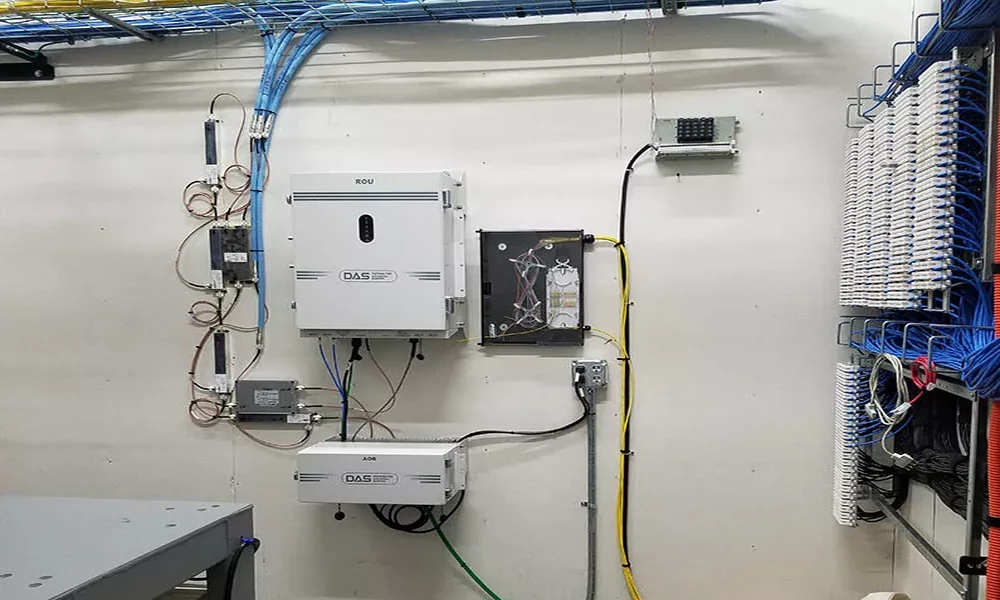
Installation quality therefore has a long life after the project ends. Clear labels, protected cable routes, organized equipment rooms, and properly secured connections all make later service easier. A small fault hidden above a ceiling can take hours to find if documentation is poor. With good records, technicians can narrow the search quickly. It is a simple point, but one that often separates easy maintenance from an expensive troubleshooting visit.
DAS Antenna Placement Still Shapes Daily Coverage
An in-building DAS design can only perform as well as the antenna layout allows. Antennas placed too far apart may leave weak zones, while units placed too closely can create unnecessary overlap. Building materials complicate things further. Concrete, steel, coated glass, elevators, and mechanical spaces can all change signal behavior. Even after installation, the quality of coverage still depends on whether antenna locations match how people actually use the building.
Movement matters here. An employee may begin a call in an office, walk through a corridor, enter an elevator lobby, and finish in a shared meeting area. Coverage should remain usable throughout that path. Static testing can miss those transitions. In practice, roaming checks often reveal issues that ordinary signal readings do not. If one handoff area feels weak, a small adjustment to antenna levels or placement may improve the experience without changing the whole system.
Capacity Becomes Clear During Busy Building Hours
A second performance factor for in-building das systems is capacity. Strong coverage does not automatically mean strong service when hundreds of devices become active together. Busy meeting floors, hotel lobbies, medical waiting areas, and shared workspaces can create sudden traffic spikes. A system may perform perfectly early in the morning, then feel slower when staff, visitors, and contractors all begin using mobile data at the same time.
That is why post-installation testing should include busy periods whenever possible. Average traffic can hide the real pressure points. Suppose a conference level regularly fills with 120 people for afternoon events. If it was tested only when empty, the results may look excellent but tell only part of the story. Reviewing performance during realistic demand gives property teams a much clearer view of whether the system still matches how the building is actually being used.
Building Changes Can Shift Signal Behavior
An in-building das does not operate in a fixed environment forever. Tenants renovate. Walls move. New equipment arrives. Glass partitions, metal storage, furniture, or even large displays can affect how signals move through a space. A floor that worked well after the original installation may develop a weak area six months after a major fit-out. That change may come from the building itself rather than from a failed component.
This is where baseline testing becomes valuable. If technicians have the original floor plans, signal readings, and antenna locations, they can compare old and new conditions instead of starting from scratch. That shortens troubleshooting and helps prevent unnecessary hardware changes. It also gives property teams a clearer answer when complaints appear. Sometimes the fix is a small adjustment in one zone, not a large system upgrade across the entire building.
Testing and Maintenance Keep Performance Consistent
Ongoing testing should be focused, not excessive. Regular checks of signal quality, alarms, equipment status, and high-use areas can help catch changes before they become widespread complaints. Battery condition, connectors, and cable paths deserve attention too. A system that worked well at commissioning can still develop small issues over time. Catching those problems early is usually much easier than waiting until users begin reporting poor service across several floors.
Maintenance records matter for the same reason. Technicians should be able to see what was tested, what changed, and which areas were adjusted previously. That history helps them spot patterns instead of treating every service call as a new mystery. There is a tradeoff, of course. Ongoing maintenance takes time and budget, but it usually costs less than repeated emergency troubleshooting after coverage has already become a business problem.
Conclusion
Long-term DAS performance depends on more than the original installation. RF balance, antenna placement, cabling, capacity, building changes, testing, and maintenance all influence how well the system works after handover. Commercial properties that keep an eye on those factors are better positioned to catch small problems early. They also gain a clearer path for adjusting coverage as tenants, layouts, traffic, and mobile use continue to change over time.
CMC Communications supports Houston commercial properties with DAS design, installation, testing, troubleshooting, and related wireless infrastructure services. Their team can review signal conditions, equipment performance, antenna layouts, cable routes, and changing building needs after installation. That broader support can help property teams maintain reliable indoor cellular service instead of waiting for small issues to become larger complaints, costly disruptions, or more complicated upgrades later.
Frequently Asked Questions
Question: Why can DAS performance change after installation?
Answer: Building use changes over time. New walls, equipment, tenants, and higher device traffic can affect coverage or capacity. Some performance changes also come from cable, connector, or equipment issues that develop gradually.
Question: How often should indoor DAS performance be checked?
Answer: There is no single schedule for every property. Reviews make sense after renovations, major tenant changes, repeated complaints, equipment moves, or noticeable increases in mobile traffic.
Question: Can strong signal bars still mean poor performance?
Answer: Yes. Strong signal does not always mean enough capacity or balanced uplink performance. Heavy traffic, interference, or poor RF balance can still cause slow data or unstable calls.
Question: Why are original test records useful later?
Answer: Baseline records show how the system performed when it was first completed. Technicians can compare new readings with those results, making it easier to identify what changed and where the problem began.
Question: Do renovations always require DAS changes?
Answer: Not always. Some renovations have little effect, while others can create new signal barriers. Retesting the changed area helps determine whether a small adjustment is enough or whether additional coverage support is needed.
| CONTENT CHECKLIST | |
| Total Word Count | 1485 |
| Grammarly Premium Score | 96 |
| Readability Score | 46 |
| Plagiarism | 100% |
| Primary Keyword Usage | 2 times |
| Secondary Keywords Usage | 2 Times |
| Highest Word Density | 1.5 |
| Brand Name Integration | 1 Time |
| Ai Detection Score | 15 |
| Maximum Paragraph Length | 6 Lines |
| FAQs | 5 |
What Determines the Performance of In Building DAS Systems in Houston After Installation
